FAQ
Bind Robots (for unbound devices)
Version: v1.0Release Date: 2026-06-08General
Recommended Reading
This page is designed for users to bind multiple robots (different models) quickly. For single robot, once you bind it in your organization using Agibot Go under certain OMP server, it will be bound automatically. On the LinkSoul platform:
| Region | Link Address |
|---|---|
| Europe | LinkSoul Europe |
| North America | LinkSoul North America |
| Singapore | LinkSoul Singapore |
Add device via verification code
- Boot your robot.
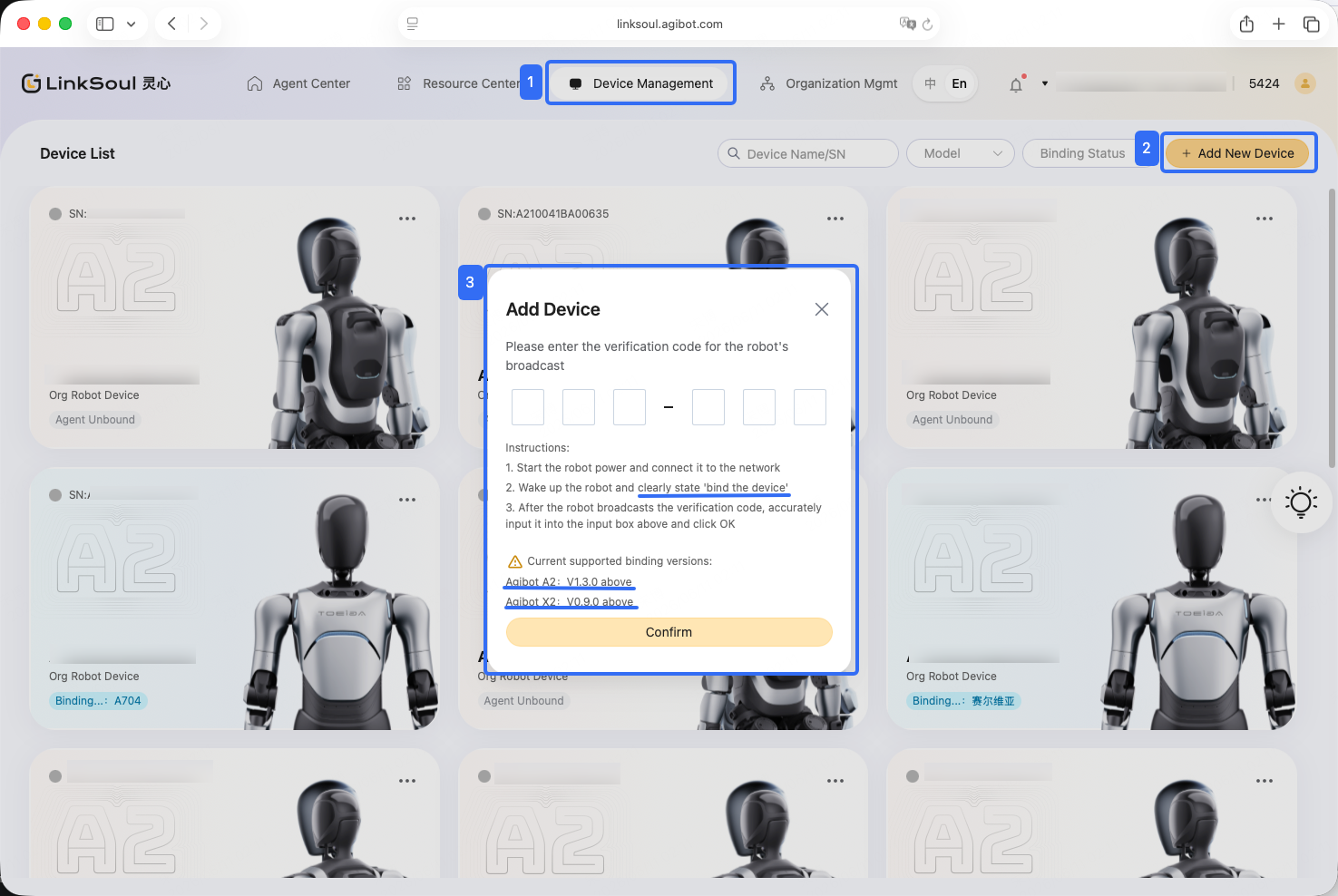
- Click Device Management on the navigation bar.
- Follow the on-screen instructions to interact with the robot via voice and obtain a 6-digit verification code (valid for 5 minutes).
- Enter the verification code and submit: After entering the verification code on the platform, click Confirm to submit. Once the system verification succeeds, the device binding is complete.
You can follow the steps below to add your robot.
Notes
-
Avoid triggering verification code requests too frequently, as excessive requests may cause acquisition failures.
-
If the device has already been bound to another organization, it cannot be bound again. Contact the administrator of the original organization to unbind it, or fill in the contact form for assistance.
Read Next
FAQ
My Controller Doesn't Work