Products
Remote Controller Combos 🎮
Version: v1.0Release Date: 2026-06-08X2
Recommended Reading
The remote control comes pre-configured and paired out of the box; there is no need to pair it again. Simply press the button to activate it. If the controller is not paired, refer to this page.
Button diagram
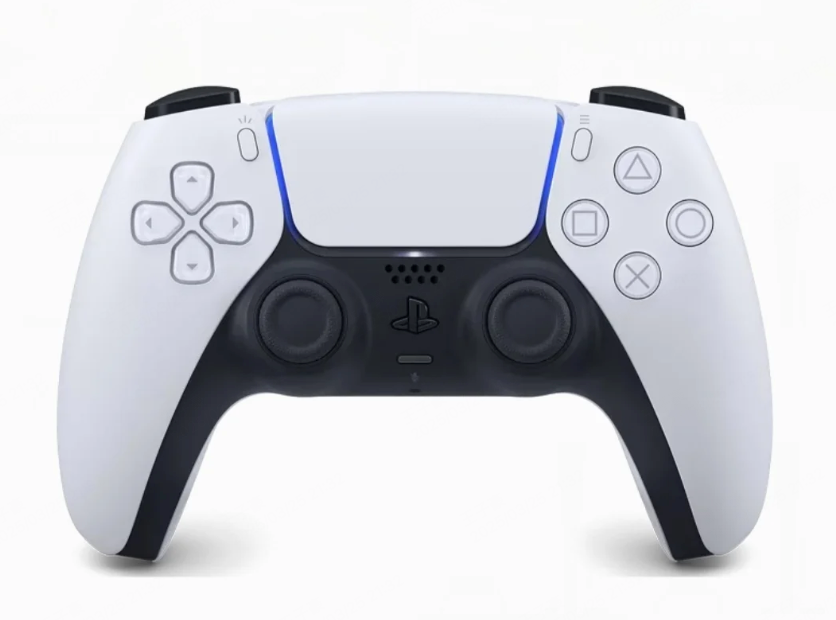
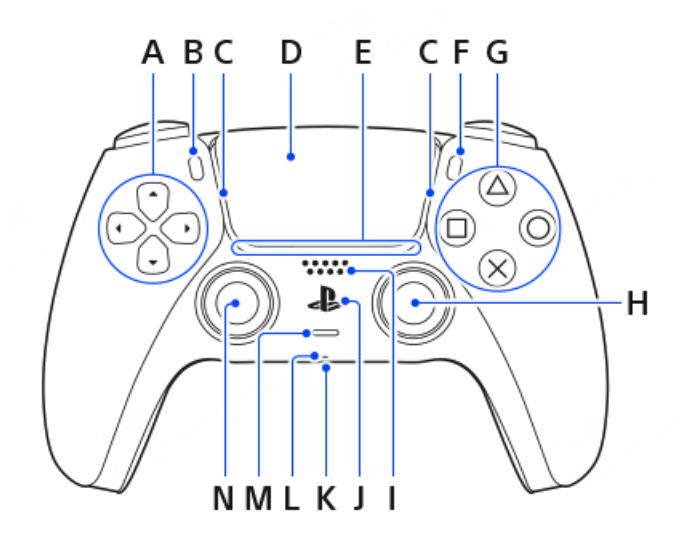
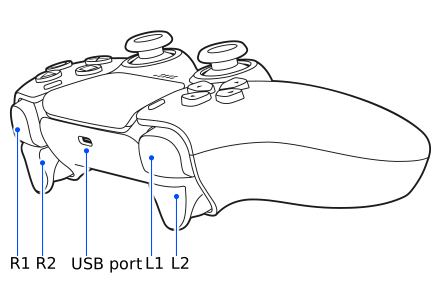
| Key | X2 Remote Control Key Name & Function |
|---|---|
| A: D-Pad | Left-side cross buttons: ↑, ↓, ←, → four directional keys |
| B: Create button |  Create button Create button |
| C: Light bar | Light bar |
| D: Touchpad | Touchpad |
| E: Player indicator | Player indicator |
| F: Options button |  Options button Options button |
| G: Four action buttons | △, □, ○ and × four function buttons |
| N & H: Joystick area | N: Left joystick (controls forward/backward/left/right movement) H: Right joystick (controls rotation direction) |
| J | ”PS” button |
Remote control light indicator guide
| Status | Light Pattern |
|---|---|
| Remote power on / connecting | Blue light breathing blink |
| Remote connecting in progress | Blue light solid on |
| Remote pairing successful | White light solid on |
| Remote normal operation | White light breathing |
| Remote charging: - 0–20%: fast flash - 20–100%: slow flash | Orange light breathing |
| Remote charging complete | Orange light turns off |
| Firmware update | White light fast flash |
Combos
Button operation guide
Legend
| Symbol | Meaning |
|---|---|
| ⏱ | Tap together / simultaneous short press |
| LS | Left Stick |
| RS | Right Stick |
| Create | PS5 Create button |
Startup flows
| Scenario | Button Operation | Result |
|---|---|---|
| Hoisted Startup | ⏱ L2 + X → ⏱ R2 + X → push joystick | Position standing → stable standing → walking/running mode |
| Supine Startup | ⏱ ↑ + △ → push joystick | Stand up from lying face-up → walking/running mode |
| Prone Startup | ⏱ ↑ + △ → push joystick | Stand up from lying face-down → walking/running mode |
| Seated Startup | ⏱ ↑ + X → ⏱ ↑ + □ → push joystick | Seated ready → stand up → walking/running mode |
Mode switches
| Action | Button Operation | Result |
|---|---|---|
| Position Standing Mode | ⏱ L2 + X | Switch to position standing mode |
| Seated Ready Mode | ⏱ ↑ + X | Switch to seated ready mode |
| Stable Standing Mode | ⏱ R2 + X | Switch to stable standing mode |
| Zero-Torque Mode | ⏱ L1 + R1 + Create | Switch to zero-torque mode |
| Damping Mode | ⏱ L2 + R2 + Create | Switch to damping mode |
| Emergency Stop | ⏱ L1 + R1 + Create | Enter emergency stop / zero-torque mode |
| Off-Road Mode | ⏱ R2 + ↑ | Switch to off-road mode from walking/running mode |
Walking / running controls
| Action | Button Operation |
|---|---|
| Move Forward | LS ↑ |
| Move Backward | LS ↓ |
| Move Left | LS ← |
| Move Right | LS → |
| Rotate Left | RS ← |
| Rotate Right | RS → |
Posture actions
| Action | Button Operation | Note |
|---|---|---|
| Sit Down | ⏱ L2 + ← | Use from stable standing mode |
| Stand Up from Sitting | ⏱ ↑ + □ | Use from seated position |
| Stand Up from Lying | ⏱ ↑ + △ | Use from lying position in zero-torque mode |
| Squat / Stand Height Control | Hold △ + move LS ↑ / ↓ | LS ↑ = stand up, LS ↓ = squat down |
Shutdown flows
| Scenario | Button Operation / Flow |
|---|---|
| Hoisted Shutdown | ⏱ L2 + X → ⏱ L2 + R2 + Create → ⏱ L1 + R1 + Create → lift robot feet off ground → power off |
| Lying Shutdown | ⏱ L2 + X → manually assist robot to lie down → ⏱ L2 + R2 + Create → ⏱ L1 + R1 + Create → power off |
| Seated Shutdown | ⏱ L2 + ← → ⏱ L2 + R2 + Create → ⏱ L1 + R1 + Create → power off |
Safety notes
| Situation | Note |
|---|---|
| Damping Mode | The robot may slowly collapse. Keep the robot supported and clear of obstacles. |
| Zero-Torque / Emergency Stop | The robot may lose support and fall. Pay close attention to robot safety. |
| Seated Mode | The robot’s back should be supported by a chair or assisted by a person. |
| Squat Control | Monitor balance during squatting and assist the robot if necessary. |
Gestures
| Action Name | Button Instructions |
|---|---|
| Left-hand Wave | ⏱ Create + L1 + △ |
| Right-hand Wave | ⏱ Create + R1 + △ |
| Left-hand Handshake | ⏱ Create + L1 + X |
| Right-hand Handshake | ⏱ Create + R1 + X |
| Left-hand Blow Kiss | ⏱ Create + L1 + □ |
| Right-hand Blow Kiss | ⏱ Create + R1 + □ |
| Left-hand Salute | ⏱ Create + L1 + ○ |
| Right-hand Salute | ⏱ Create + R1 + ○ |
| Left-hand Fist Bump | ⏱ Options + L1 + ↓ |
| Right-hand Fist Bump | ⏱ Options + R1 + ↓ |
| Left-hand High Five | ⏱ Options + L1 + → |
| Right-hand High Five | ⏱ Options + R1 + → |
| Left-hand Raise Hand | ⏱ Options + L1 + ↑ |
| Right-hand Raise Hand | ⏱ Options + R1 + ↑ |
| Waist Rotate Clockwise | L1 + push right joystick right. The waist rotates clockwise. Reset quickly by walking or crouching with the joystick. |
| Waist Rotate Counterclockwise | L1 + push right joystick left. The waist rotates counterclockwise. Reset quickly by walking or crouching with the joystick. |
| Waist Bend Forward | L1 + push right joystick down. The waist bends forward/downward. Reset quickly by walking or crouching with the joystick. |
| Waist Straighten | L1 + push right joystick up. The waist straightens upward. Reset quickly by walking or crouching with the joystick. |
Read Next
Products
VR Teleoperation Quick Start